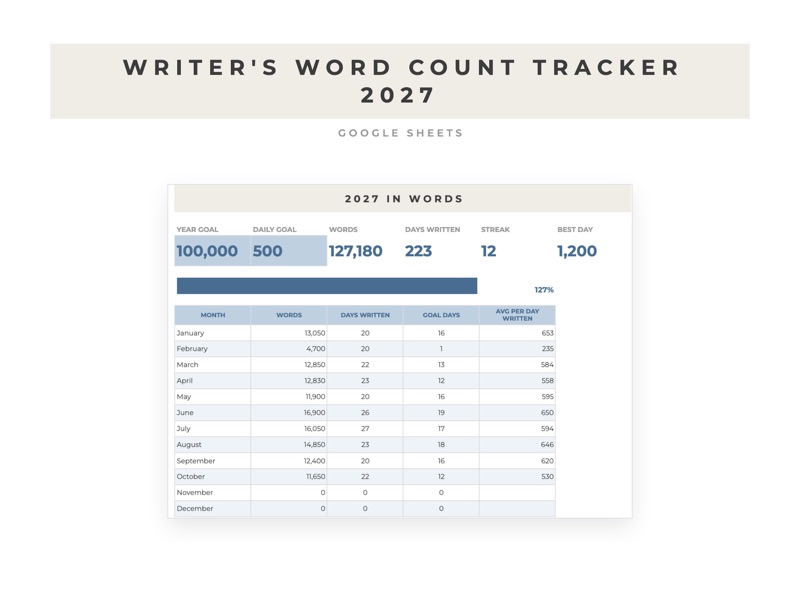
How to track a daily word count goal in Google Sheets
A word count tracker shows you two things a notebook can't: whether you're on pace for your goal, and how many words a day it takes to finish by your deadline.
Set up the log
Make one row for every day of the year, with these columns:
- Date
- Words written
- Project
- Running total
- Notes
To fill in the dates, type January 1 in A2, then =A2+1 in A3 and copy it down to row 366. The running total in D2 is =SUM($B$2:B2), copied down.
Set a goal
Put your goal for the year in a cell off to the side, say H1, and track the numbers that matter:
- Words so far:
=SUM(B2:B366) - Days you wrote:
=COUNTIF(B2:B366,">0") - Best day:
=MAX(B2:B366) - Words a day to reach the goal:
=(H1-SUM(B2:B366))/(DATE(2027,12,31)-TODAY()+1)
Plan each project
On a second tab, list each project with its target length and deadline. With the target in B2 and the deadline in C2, the words written so far for it are =SUMIF(Log!C:C,A2,Log!B:B), and the words a day you need from now on are =(B2-D2)/MAX(1,C2-TODAY()).
If that number looks too big, move the deadline or cut the target. It's better to know in March than in November.
Make today easy to find
Select the log, open Format, then Conditional formatting, and use the custom formula =$A2=TODAY() with bold text. Today's row stands out when you open the sheet on your phone.
If you'd rather not build it
The Word Count Tracker 2027 has all 365 days filled in, a dashboard with your streak and a table by month, and a projects tab that shows the words a day you need for each deadline.